Step-by-Step Walkthrough
UI & Setup Guide
Database Onboarding & Chatting Guide
Follow this visual walkthrough to connect your database, scan metadata tables, declare business semantics in the Model Definition Language (MDL), configure domain knowledge, and start chatting with your AI agent.
The 4-Step Onboarding Wizard
1
Connectivity
Configure credentials & test link
2
Catalog
Scan & select source tables
3
Semantic Bridge
Map dimensions, measures & logic
4
Finalize
Inject domain context & launch
1
Step 1: Source Connectivity & Engine Selection
Configure database parameters and test live connectivity
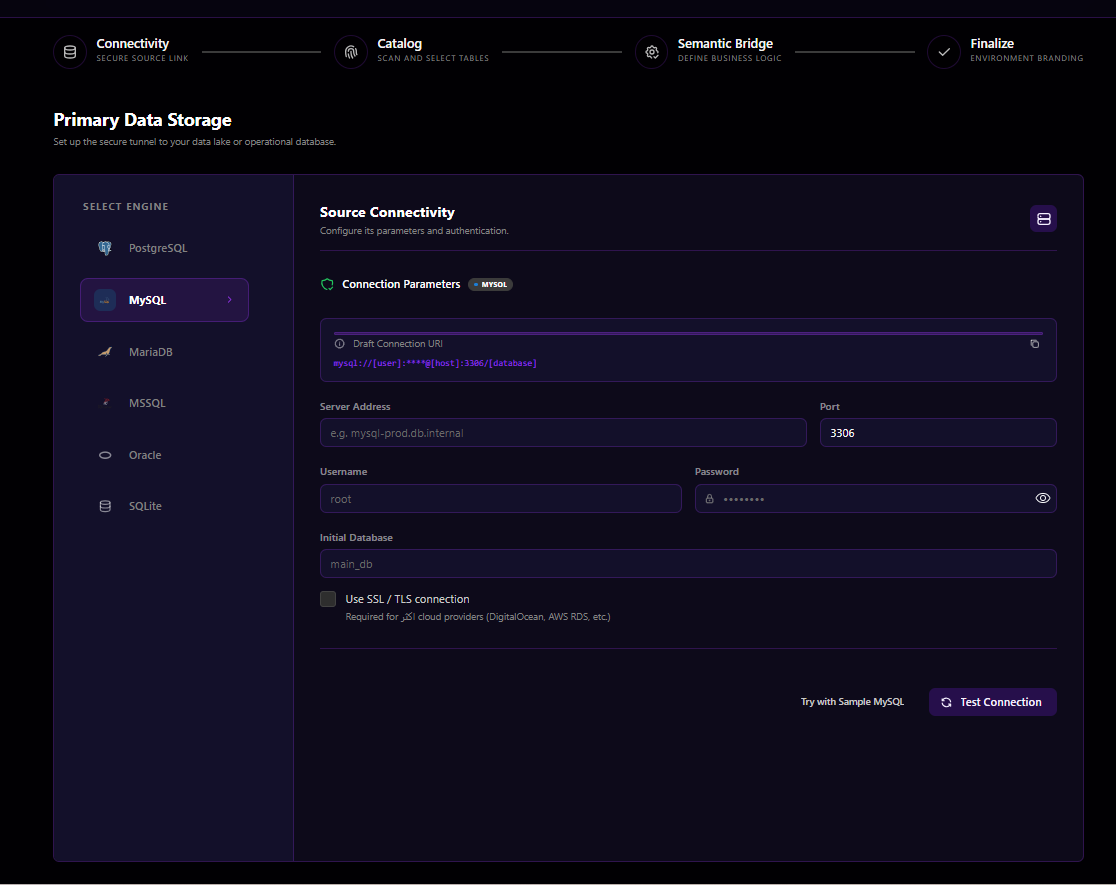
Key Configuration Options:
- Select Engine: Choose your target database dialect (
PostgreSQL,MySQL,MariaDB,MSSQL,Oracle, orSQLite). - Connection Parameters: Enter Server Address / Host, Port (e.g.
3306for MySQL,5432for Postgres), Username, Password, and Initial Database. - SSL / TLS Security: Toggle SSL encryption for cloud-managed instances (DigitalOcean, AWS RDS, GCP Cloud SQL, Supabase, Neon).
- Test Connection: Click Test Connection to run an instant network ping and verify user credentials before proceeding.
2
Step 2: Metadata Extraction & Catalog Selection
Discover and select the tables to include in your semantic layer
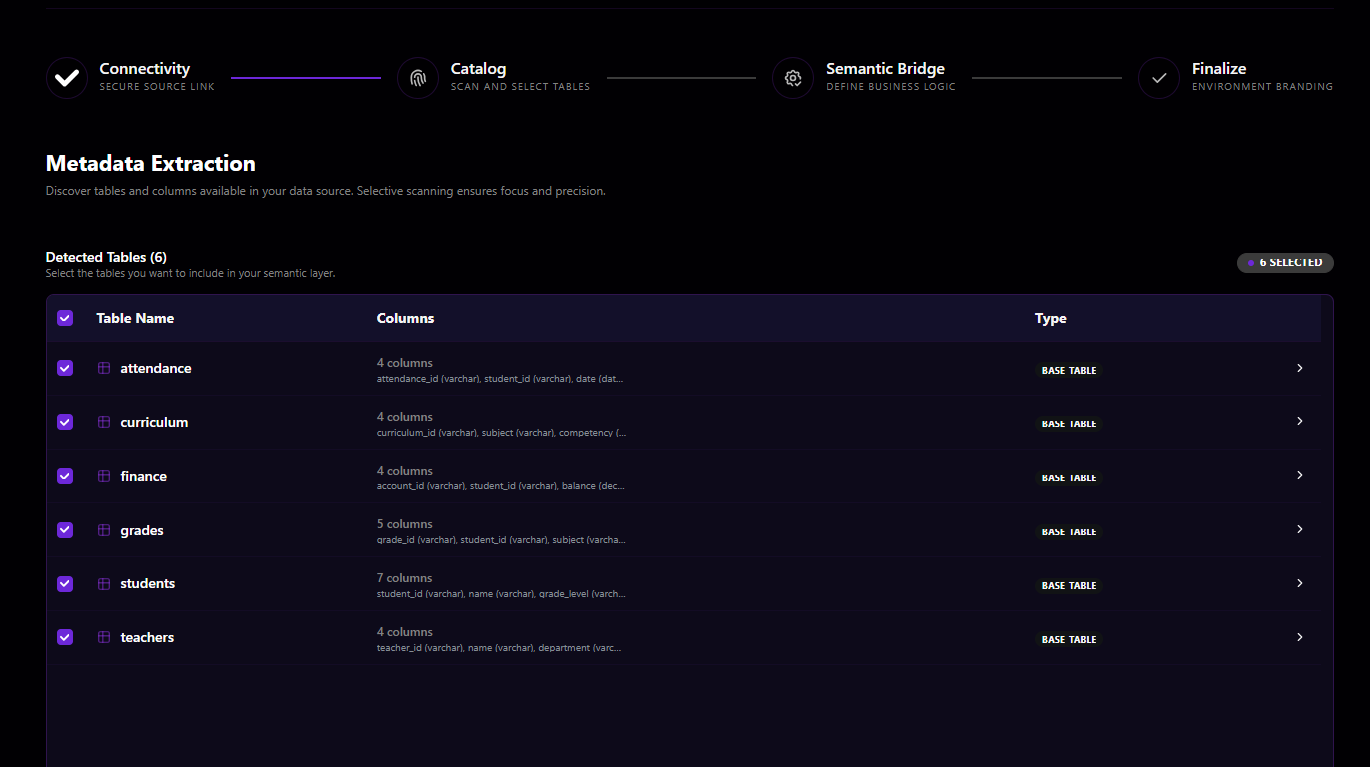
Selective Scanning & Table Ingestion:
- Automatic Table Discovery: Orcha queries system catalogs (e.g.
INFORMATION_SCHEMA,sys.tables) to detect available tables, row estimates, and column data types. - Scope Selection: Check only the tables relevant to your business domain (e.g.,
students,teachers,attendance,curriculum,grades,finance) to optimize agent reasoning accuracy and eliminate noise. - Column Count Preview: Preview data types (
varchar,integer,datetime,decimal) for each detected table.
3
Step 3: Semantic Layer (MDL) Business Modeling
Map columns to business definitions, dimensions, measures, and caveats
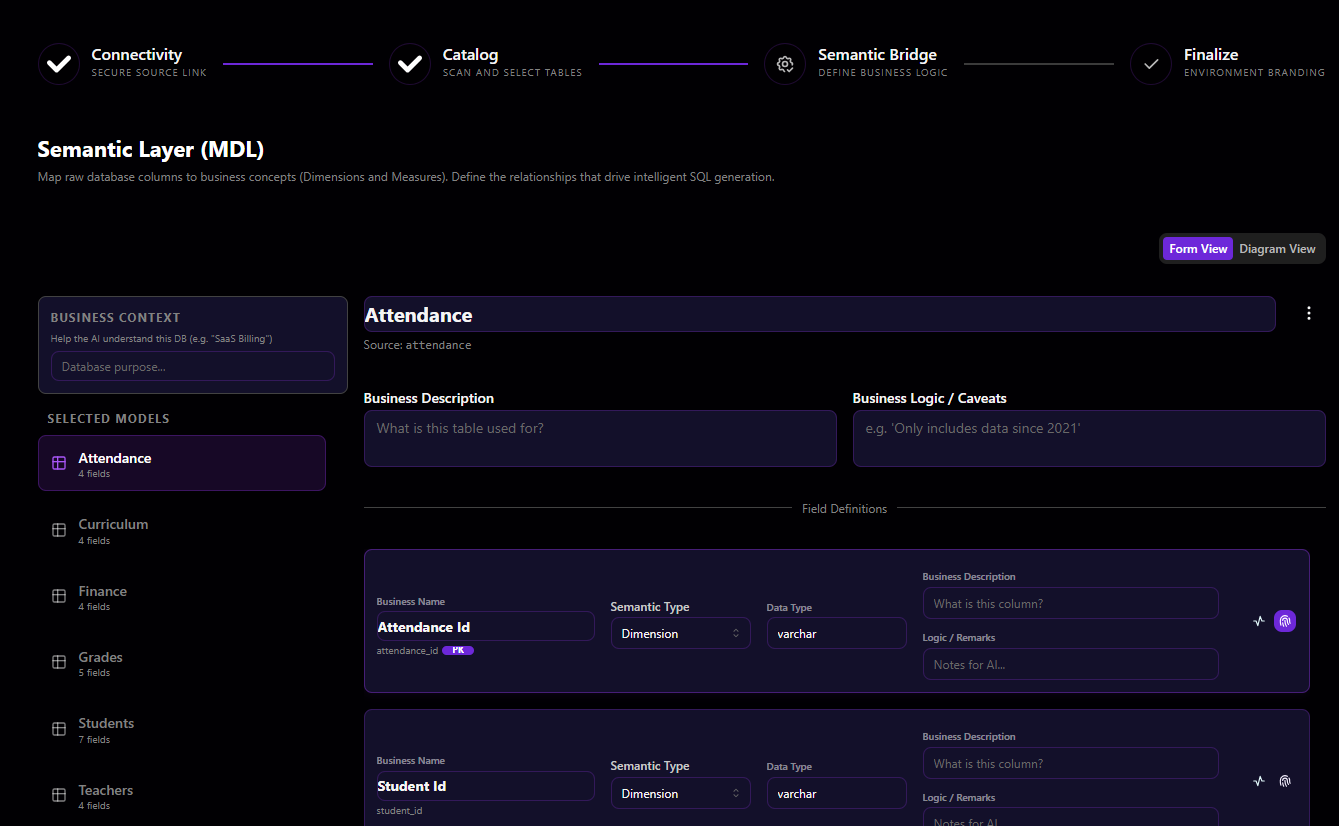
Defining Semantic Metadata:
- Business Descriptions: Annotate what each table is used for in plain English so the LLM understands its purpose.
- Business Logic & Caveats: Provide filtering rules and known quirks (e.g., "Only includes data since 2021", "Cancelled orders have status = 'VOID'").
- Semantic Typing: Classify fields into Dimensions (categorical grouping attributes) or Measures (quantitative numerical aggregates).
- Primary Keys & References: Mark primary key indicators (
PK) to assist the BFS graph join engine. - View Modes: Switch seamlessly between Form View and Diagram View (React Flow canvas).
4
Step 4: Finalize Deployment Profile & Domain Context
Inject domain common sense and branding metadata
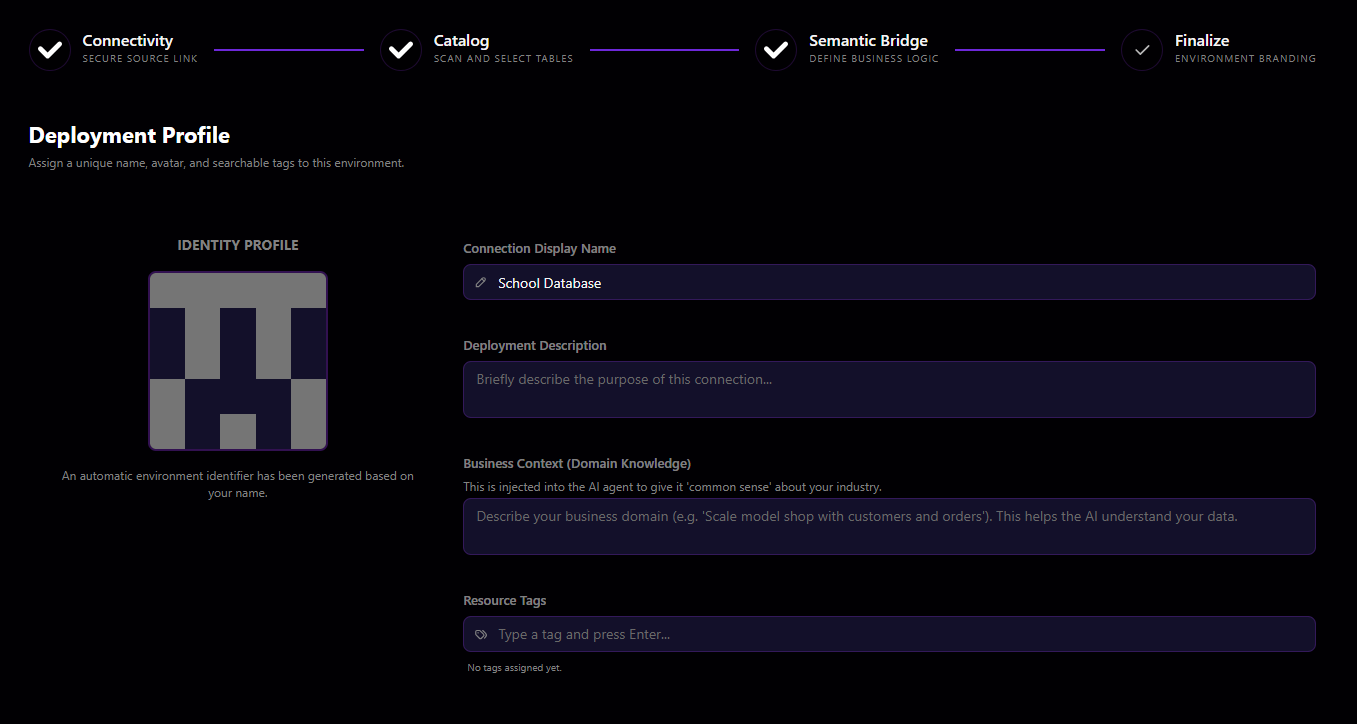
Injecting Domain & Industry Knowledge:
- Connection Display Name: Assign an intuitive label (e.g.
School Database,Production Sales). - Business Context (Domain Knowledge): Give the agent overarching common sense about your industry (e.g., "Educational Institution Management System with student enrollment, faculty workloads, grading periods, and tuition accounts").
- Resource Tags: Add searchable tags for organizational categorization and API key multi-tenancy scoping.
5
Step 5: Natural Language Database Chatting
Ask natural language questions and receive accurate semantic answers
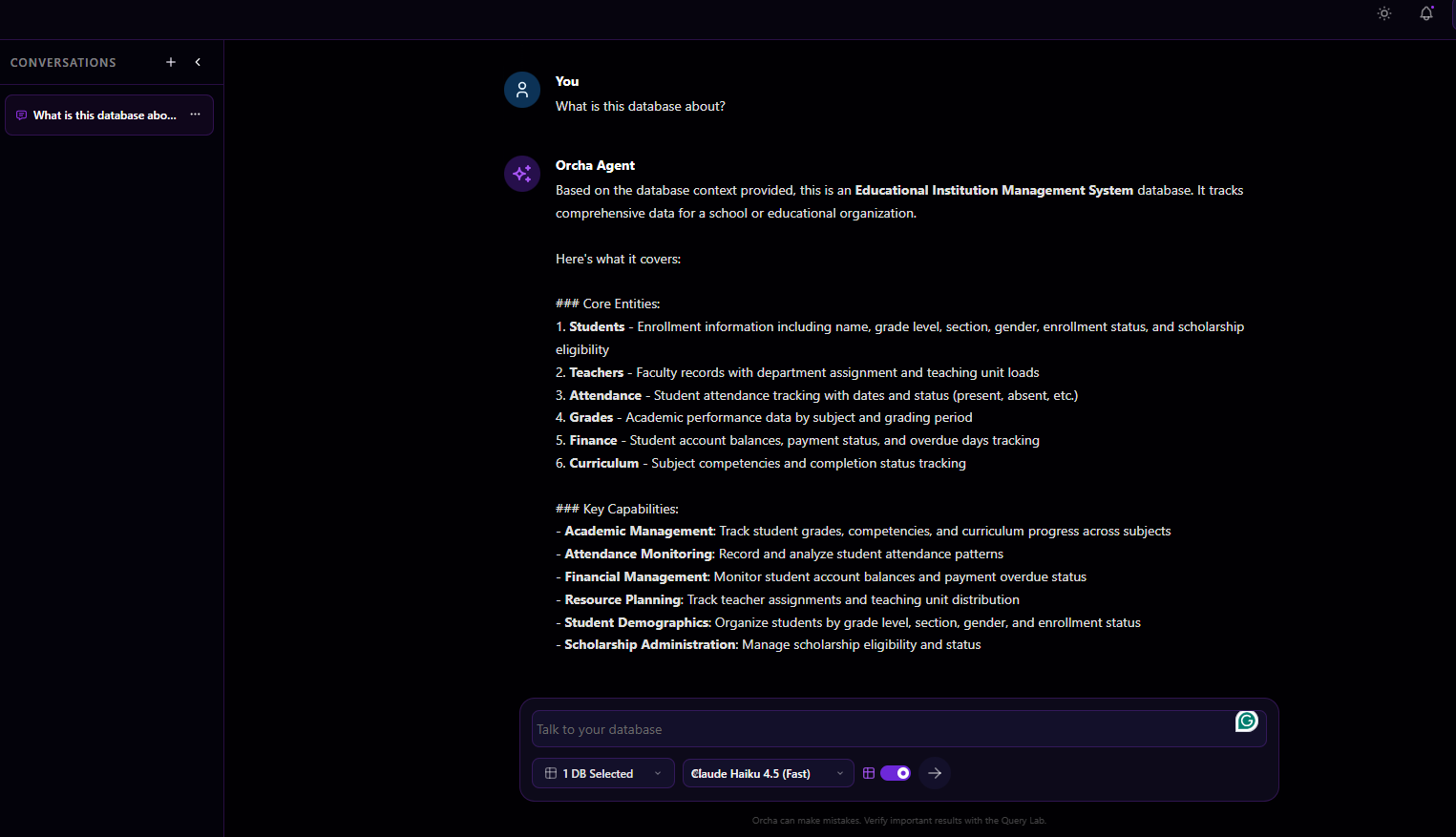
Interactive Chat Experience:
- Zero Prompt Engineering Needed: Ask high-level questions like "What is this database about?" or "Which students are at risk of missing attendance requirements?".
- Domain-Aware Synthesis: Orcha Agent understands the business entities (Students, Teachers, Attendance, Grades, Finance, Curriculum) and core capabilities.
- Model Selector: Switch between models dynamically (e.g.
Claude Haiku 4.5 (Fast),Claude Sonnet 3.7,GPT-4o) directly in the chat bar. - Multi-Database Scope: Select which connected databases to query via the database pill selector.